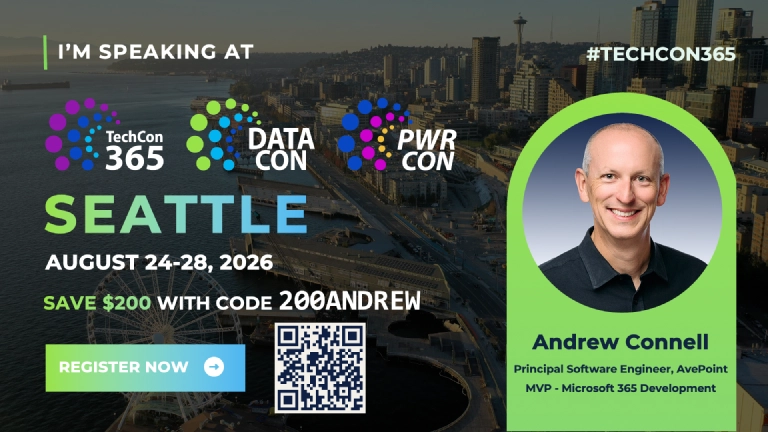
I’m excited to head back to the TechCon365 conference in Seattle, WA, August 24-28, 2026, presenting a full day workshop & pair of half-day workshops on customizing Microsoft 365 Copilot and agentic engineering!

TechCon365 in Seattle, WA in August 24-28, 2026
Save $200 off your registration when you use the discount code 200ANDREW
Full-Day Workshop: Develop Declarative Agents to extend Microsoft 365 Copilot to get the most out of your investment!
You’ve rolled out Microsoft 365 Copilot and now your organization has entered the AI revolution.
Mission accomplished… or is it?
Out of the box, Microsoft 365 Copilot only has access to the underlying LLM’s baseline knowledge and some content in your Microsoft 365 tenant.
But most companies have valuable data outside Microsoft 365—manuals, standard operating procedures, policies, inventory systems, ERPs, CRMs, sales data, and more!
After learning how copilot works, you’ll learn how to unlock copilot’s power by extending its knowledge and teaching it new skills! From populating the semantic index with unstructured content using Microsoft Graph connectors to creating actions and implementing RAG patterns for real-time relational data access, you’ll make copilot truly yours!
This workshop for full-stack developers focuses on creating declarative agents for Microsoft 365 Copilot to implement specific scenarios. You’ll learn how to build scalable enterprise solutions without additional Copilot Studio licensing costs. Follow along as I build these connections, APIs, actions, and custom agents…or roll up your sleeves and build your own using your Microsoft 365 tenant and Microsoft 365 Copilot license!
Learn more about my workshop & register today (save $200 with the code 200ANDREW)! →
Full-Day Workshop: Extend Microsoft 365 Copilot with Custom Agents: Copilot Studio and the Agents Toolkit Side-by-Side
Microsoft 365 Copilot knows what’s in Microsoft Graph: your emails, Teams chats, and some SharePoint files. But the data that actually runs your business, your SOPs, CRM records, inventory systems, and line-of-business applications, lives outside that boundary. Extending Copilot to reach that data is where agents come in.
The challenge? Microsoft offers two primary tools for building agents, Copilot Studio and the Microsoft 365 Agents Toolkit (ATK) for VS Code, and their documentation rarely gives you a clear side-by-side comparison. Which one fits your team? Which one fits your scenario? What are the real tradeoffs?
In this full-day workshop, Microsoft MVPs Mark Rackley and Andrew Connell answer those questions by building the same agent with both tools, live, throughout the day. You’ll see every decision point, every capability difference, and every tradeoff as it happens. This isn’t a pitch for one tool over the other. It’s an honest comparison designed to help you make the right call for your organization.
We’ll start with how Microsoft 365 Copilot actually works and what customization options exist. Then Mark and Andrew will work through the same scenarios in parallel: adding custom instructions, connecting knowledge sources, integrating external data through actions and connectors, and extending Copilot’s capabilities for real business use cases. We’ll also cover the practical realities that matter for planning: licensing requirements, cost implications, and the skills your team needs for each approach.
This workshop is designed for a broad audience. Whether you’re a developer evaluating pro-code tooling, a power user building agents in Copilot Studio, or a project manager charting your organization’s Copilot extensibility strategy, you’ll walk away knowing what’s possible, what each option requires, and which approach fits your situation.
Learn more about my workshop & register today (save $200 with the code 200ANDREW)! →
Breakout Session: Supercharge Your Microsoft 365 Dev Workflow with Claude Code
You’ve probably already experimented with AI coding tools like GitHub Copilot, Cursor, or even Claude Code out of the box. They’re useful, but most developers are only scratching the surface of what’s possible. This session is about taking that foundation and going significantly deeper.
Claude Code isn’t here to do your job for you. It’s here to make you dramatically better at it. Think of it less like autopilot and more like a turbo for the skills and experience you’ve already built. The real shift happens when it stops feeling like a tool you use and starts feeling like a development environment that understands you: your coding style, your team’s conventions, your project context, and your organization’s standards.
Through skills, agents, plugins, and MCP servers, you’ll learn how to shape Claude Code into something that works the way you work, helps you move faster, and keeps you learning as you go. You’ll also walk away knowing how to troubleshoot when things go sideways and how to consistently get more out of every session. Whether you’re working with Microsoft Graph, building Teams apps, or anywhere else in the Microsoft 365 ecosystem, the goal is simple: leave with the knowledge and practices to become a more powerful, productive, and efficient developer.
Learn more about my session & register today (save $200 with the code 200ANDREW)! →
Breakout Session: Give Your Declarative Agent Superpowers: Microsoft Graph as an API Plugin, Zero Code Required
You’ve built a Declarative Agent. It answers questions. It references SharePoint documents. But what if it could do things, like create and update items in a SharePoint list, without writing or deploying a single line of backend code?
Here’s the secret: Microsoft Graph is a REST API. API plugins connect Declarative Agents to REST APIs. You don’t need a custom backend to unlock these capabilities. You just need the right configuration.
In this session, I’ll walk through building a custom action that reads from and writes to a SharePoint list via the Microsoft Graph, using two approaches: a hand-crafted OpenAPI Description and TypeSpec, both through the Microsoft 365 Agents Toolkit in VS Code. Once you see the pattern for SharePoint, you’ll know exactly how to wire up any Graph endpoint your scenarios require.
Learn more about my session & register today (save $200 with the code 200ANDREW)! →
Breakout Session: Better Instructions = Better Agents: Prompt Engineering & Debugging for Creators of any Background
Every agent platform gives you a text box to write instructions. Most people treat it like a suggestion field. But those instructions are the primary way you shape your agent’s behavior, and there’s a real craft to writing them well.
In this session, I’ll break down what makes agent instructions effective: how Markdown structure helps the model parse your intent, when and how to use few-shot examples, how your word choices signal the depth of reasoning you expect, and why formatting decisions that seem minor can have outsized effects on agent behavior. We’ll also tackle the part nobody talks about enough: debugging. When your agent ignores instructions, calls the wrong tool, or gives a weird response, you need a systematic way to figure out why. I’ll show you techniques for using the agent as its own debugger, getting it to reflect on its instructions, explain its decision-making, and help you identify where your guidance is ambiguous or conflicting.
This isn’t tied to any one platform. Whether you’re working in Copilot Studio, creating Declarative Agents for Copilot with the M365 Agents Toolkit (ATK), Microsoft Foundry, OpenAI’s ChatGPT, Anthropic’s Claude, or any other agent framework, you’ll walk away with a repeatable approach to writing instructions that make your agents more reliable, more useful, and easier to troubleshoot.
Learn more about my session & register today (save $200 with the code 200ANDREW)! →

Microsoft MVP, Full-Stack Developer & Chief Course Artisan - Voitanos LLC.
Andrew Connell is a full stack developer who focuses on Microsoft Azure & Microsoft 365. He’s a 22-year recipient of Microsoft’s MVP award and has helped thousands of developers through the various courses he’s authored & taught. Whether it’s an introduction to the entire ecosystem, or a deep dive into a specific software, his resources, tools, and support help web developers become experts in the Microsoft 365 ecosystem, so they can become irreplaceable in their organization.